Six Ways to Troubleshoot in Local Area Networks
October 12, 2016
“Network transmission media can be copper, fibre or wireless so network technicians need to be armed with troubleshooting tools that can tackle any problem they encounter,” explains Tim Widdershoven, Global Marketing Manager at IDEAL Networks. “This makes it more challenging for technicians — if errors occur, they could be located in a wide range of different media and layers of the network.”
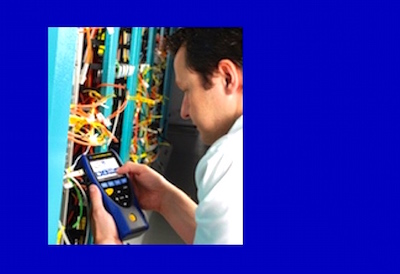
Here are six ways that technicians can use a tester to effectively troubleshoot errors.
1. Physical faults in network cabling
Most common network errors are at a physical level, such as problems with copper or fibre optic cabling, so this should always be the first place a technician starts. For copper cabling, a network troubleshooting tester should be able to locate faults anywhere along a cable link using TDR (time domain reflectometer) technology to pinpoint distance to common faults. A tester that checks individual conductors in the cable versus checking only paired conductors reduces the time required to identify and repair the fault. Typically cable testers display wiremap faults as a pair even when only one conductor is at fault. When checking optical fibre, a tester that accepts common optical SFP (small form pluggable) modules allows the user to quickly determine whether the cabling or the network equipment is at fault.
2. Endpoint network testing
In this configuration the tester acts like any other device on the network yet it has the capability to monitor and detect problems that may not be visible when using software troubleshooting tools. An essential part of identifying the source of errors is understanding the Ethernet network. This mode can verify that the network port to which the tester is connected has complete access to all network resources and can test for PoE (Power over Ethernet) when necessary.
3. In-line
Dual port testers can be inserted between any two points in the network allowing it to monitor all data passing through that point. The device can show the type of Ethernet connection at the two ports and identify speed mismatches as well as detect and identify the source of network errors. It can also be connected between the internet router and the network to measure data transfer rate to the internet. In-line mode features such as Top 10 lists can also help detect devices that are using a particularly large amount of bandwidth.
4. Network map
A network map feature provides an overview of all devices on a LAN. For troubleshooting, saving this map and returning to it later can show where changes to a network have occurred. For example, if a user can no longer access a particular server, the network map can show if the server is still accessible on the network. If the troubleshooting tester has an integrated trace-route function, faulty routers can be identified in large LANs and even across WAN (wide area network) environments.
5. VoIP
Diagnostic options for VoIP (Voice over IP) connections can also be helpful for troubleshooting. The tester can be connected between a VoIP telephone and the network, measuring call quality of service (QoS) metrics to confirm reported call quality issues and identify the problem.
6. Wi-Fi
Wi-Fi networks are particularly susceptible to problems and an access point (AP) can be the source of errors, although it appears to be working correctly. A nearby AP may be using the same channel, creating interference, and reducing the range of the Wi-Fi network. Using the in-line capability, the tester can be connected between the AP and the network to monitor the combined traffic of all wireless devices. This may result in adding APs to increase bandwidth when demand exceeds the capacity of a single AP. In addition, the copper wire connecting the AP to the network could be faulty.
This article was first published by Ideal Networks as a blog: https://www.idealnetworks.net/CA/EN/News/Six-Ways-to-Troubleshoot-in-Local-Area-Networks.aspx.
![Guide to the Canadian Electrical Code, Part 1[i], 26th Edition– A Road Map: Section 74 — Airport installations](https://electricalindustry.ca/wp-content/uploads/2026/05/EIN-Stock-Guide-Code-Canada-Map-1200-768x403.png)




![Guide to the Canadian Electrical Code, Part 1[i], 26th Edition– A Road Map: Section 74 — Airport installations](https://electricalindustry.ca/wp-content/uploads/2026/05/EIN-Stock-Guide-Code-Canada-Map-1200.png)