IDEAL Networks Issues Advice on Overcoming Common PoE Challenges
Mar 18, 2020
As many different applications increasingly adopt Power over Ethernet (PoE) devices, such as phones, cameras, lighting, access controls, IDEAL Networks offers advice to help IT technicians handle everyday PoE troubleshooting scenarios.
“There are clear benefits of PoE for many applications, but with standards changing all the time, it can present challenges for IT technicians and cable engineers,” explains Tim Widdershoven, Marketing Director for IDEAL Networks. “Consider a Voice over IP (VoIP) phone, for example. If it doesn’t have a sticker which specifies what standard is required, technicians may not know whether the measured power passes or fails.”
“However, if IT technicians familiarize themselves with the most common PoE testing scenarios and select the right test equipment, PoE troubleshooting can be far more efficient,” says Tim.
Scenario 1: A VoIP phone isn’t working
If a VoIP phone goes down, first, check if there is an issue with the phone itself. Unplug it and plug in another phone that is working. If that works, then it’s an issue with the device, and not the network.
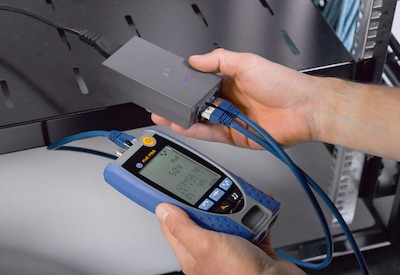
If it doesn’t, the next step is to take a measurement with a suitable PoE verifier, such as IDEAL Networks PoE Pro, to see if enough power is being provided to the phone. The easy to use and handheld PoE Pro can not only provide power measurements but also provide a pass / fail result.
If not enough power is getting to the device, then the technician will need to check the power source. If the power comes from a switch, then simply head to the comms cabinet to continue the investigation. If it’s an injector, this could be located anywhere.
Once at the power source, perform a measurement to see if the power being delivered is enough for the device. If the power at source appears sufficient, then the reason the phone isn’t working will be due to cable length or attenuation.
If the technician is at the injector and finds that it is not providing enough power, replacing this so the right amount of power is delivered may solve the problem. However, if the power source is a switch, troubleshooting is slightly different.
“If there is not enough power from a switch this is often an indication that the port is incorrectly configured and has been set with too low a capacity,” says Tim. “To troubleshoot this, the switch will need to be reconfigured with the right power budget for the device.”
Scenario 2: A VoIP phone needs replacing with a higher power device
An application may want to uninstall one type of device with one power requirement, such as a VoIP phone, and replace it with a completely different device, such as a piece of AV equipment, a CCTV camera or an access control panel. The new device may require more power to function.
“In the past IT technicians would use trial and error — installing the device to see if it would work,” explains Tim. “However, to help IT technicians save time, PoE Pro can now be used to check the maximum power draw possible at the point, ascertaining if the system is up to the job before the new device is installed.”
As with any type of installation, the quality of the cable has a big effect on performance. The IDEAL Networks PoE Pro verifier can help isolate where infrastructure can be re-used to power different devices, but also where cable upgrades might be needed.
Scenario 3: An IP CCTV camera is stuck in boot cycle
When IP CCTV cameras boot up, they ordinarily run through a test of all their extended functions, such as Pan-Tilt-Zoom, heaters or wipers. During this process, the camera is likely to draw a lot more power than required for its normal operation. If this extra power is not available, CCTV cameras can become stuck in a continual boot cycle. So even though the cable may appear to meet the standard and provide enough power, there may not be enough to manage these peaks.
To troubleshoot this, technicians should measure how much power the CCTV camera requires during start up. Then, using PoE Pro, they can test the maximum power draw possible at its location on the network. If there is not enough power available, then the power source, such as the switch, will need to be reconfigured to ensure it has a suitable capacity for start-up, as well as normal usage requirements.
“These are just a few common scenarios — IT technicians working with PoE undoubtedly will face others,” says Tim. “However, by mastering PoE troubleshooting practices and selecting the right equipment — such as the innovative PoE Pro verifier — the efficiency and profitability of jobs can be improved.”
PoE Pro from IDEAL Networks allows IT technicians to measure and report PoE Class, voltage/voltage drop, watts and injector type. Instant, easy to read test results are shown on the large backlit screen, up to a maximum of 90W (PoE++). There’s no setup or complicated configuration, users simply connect the PoE Pro to the cable or PoE port.
There is also no need for separate testers as PoE Pro is both a data cable and PoE verifier with all the familiar cable testing features of the popular VDV II Pro from IDEAL Networks.
For more information or to purchase PoE Pro from IDEAL Networks’ online shop, visit www.idealnetworks.net.